Product5 min read
Paper punch cards, without the paper
Why we built Stamposa, what we kept from the cardboard card, and the three people it has to work for at the same time.
The paper punch card is a good product. It costs nothing to explain. A customer buys a coffee, someone behind the counter punches a hole, and after ten holes the coffee is free. Nobody has ever needed a tutorial for it.
It also fails in the same three ways in every shop that uses it. The card is at home when the customer is in the queue. The owner has no idea how many are out there or how many are about to come due. And the customer list, the one asset a loyalty program is supposed to build, does not exist, because nobody wrote the names down.
Stamposa is our attempt to keep the first thing and fix the other three. The whole product fits in a sentence: a customer scans one QR, staff stamp from any phone, and the owner keeps the list.
What we refused to change
Loyalty apps usually fail at the counter, not on the dashboard. If stamping takes longer than punching a hole, staff stop doing it during the rush, and a program that only runs when the shop is quiet is not a program. So we set two rules before writing any code.
- No app for the customer. They scan the shop’s QR, verify their number once, and the card opens in the browser. It is theirs from that moment. There is nothing to install and nothing to update.
- No hardware for the shop. Staff sign in on whatever phone is already in their pocket. The camera reads the customer’s card. The standee on the counter is a printout.
Everything else, from wallet passes to analytics, sits behind those two rules. If a feature would slow the counter down, it does not ship.
Three people, three screens
A loyalty program is used by three different people who want different things, and one screen cannot serve all of them. So there are three.
The owner gets a dashboard that refreshes on its own: today’s stamps, rewards waiting to be handed over, and a live feed of what is happening at the counter. Behind it sit the customer list, a ledger of every stamp, analytics over 7, 30 and 90 days, and settings for the logo, brand colour and consent wording.
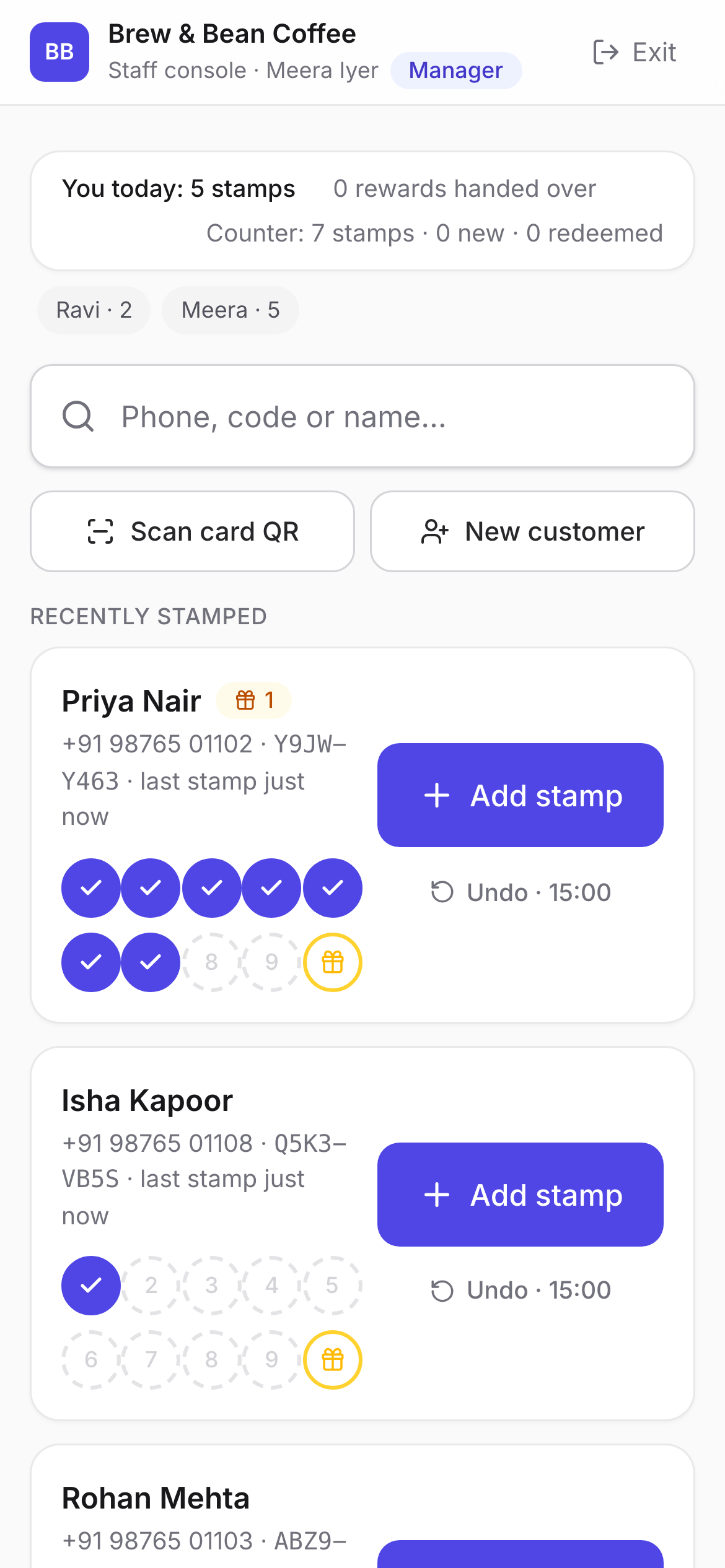
The counter gets one screen with one big search box. Type a phone number, a name or a customer code, or point the camera at the card, and the customer comes up. One tap adds the stamp. If it was the wrong customer, there is an undo button with a countdown. That is most of the job.
The customer gets their card: the shop’s colours, the stamp grid, how many to go, and a QR panel to show at the counter. It updates while they watch, so the new stamp appears before the phone goes back in the pocket. If they want it in Apple Wallet or Google Wallet, that is one more tap.
The list is yours
The quiet reason to run a loyalty program is to know who your regulars are. Stamposa records a name and a phone number or email for every customer who joins, together with their visit history, and the owner can export all of it to CSV at any time. That is not a premium tier. A loyalty tool that holds your customer list hostage has the incentives backwards.
Consent is recorded too, with the exact wording the customer agreed to, because marketing messages should be something a customer opted into, not something that happened to them. The marketing checkbox is separate and unticked by default.
Where it is today
Stamposa is live at app.stamposa.com. Setting up takes an afternoon at most: create the card, print the QR, add your staff. The guide walks through every screen for all three roles.
We will use this blog to explain the decisions behind the product as we go. Some of them are more interesting than they look from the outside. The next post is about why a stamp is not a number.